> For the complete documentation index, see [llms.txt](https://docs.licensemeter.com/llms.txt). Markdown versions of documentation pages are available by appending `.md` to page URLs; this page is available as [Markdown](https://docs.licensemeter.com/workspace/settings.md).
# Settings and sync history
Check data freshness, detection capabilities, currency, and workspace preferences.
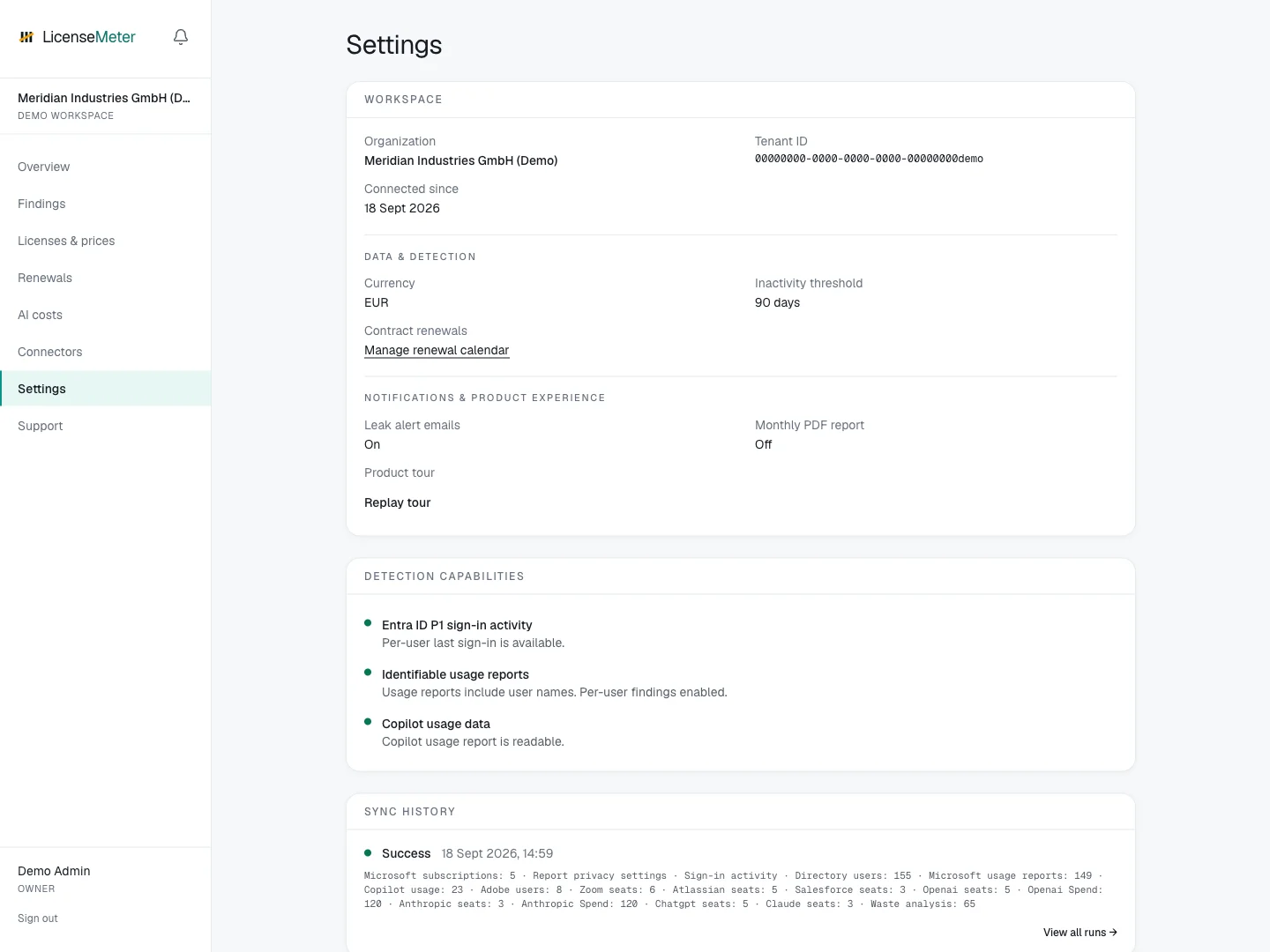
Open **Settings** to review your workspace's data coverage, recent syncs and administrative preferences.
LicenseMeter sample workspace. All names, costs and findings shown are demonstration data.
## Data and detection
**Currency** controls the workspace's license-price presentation. Review your entered contract prices when changing it. AI API costs remain in USD on the AI costs pages.
**Inactivity threshold** determines the time window used for inactivity findings. Change it to reflect your review policy, then review the recalculated results. A threshold is a screening rule, not proof that a person no longer needs access.
**Detection capabilities** explains whether sign-in activity, identifiable usage reports and Copilot usage are available. A missing capability can limit a rule without making the entire connector unusable.
## Refresh and investigate
Use **Sync now** when available to refresh a connected workspace. Scheduled live sync runs daily at 03:00 UTC. Imported data requires a fresh import; an instant scan requires another scan.
For your first refresh, use the [first-sync checklist](/getting-started/first-sync.md). A partial run may still redirect to Overview. Check **Sync history** after a failed or partial refresh. Record the provider, timestamp and error before seeking help. Expired credentials, missing permissions and provider-side report availability need different fixes.
## Members and joining
Use **Members** to invite colleagues, resend expired invitations and manage their roles. Where company-domain joining is available, **Access requests** lets Admins and Owners approve or decline requests, and **Who can join** lets an Owner choose the policy. See the [membership walkthrough](/workspace/members.md).
## Preferences and history
Settings exposes leak alert emails and monthly PDF report preferences where supported. Self-hosted email delivery also depends on the operator's configured email service and scheduler. Use **Product tour** to replay the walkthrough.
The activity log records workspace actions. Its purpose is to explain changes inside LicenseMeter; it is not a replacement for a provider's own audit trail.
See [Troubleshooting](/troubleshooting.md) for common symptoms.
---
# Agent Instructions
This documentation is published with GitBook. GitBook is the documentation platform designed so that both humans and AI agents can read, navigate, and reason over technical content effectively. Learn more at gitbook.com.
## Querying This Documentation
If you need additional information that is not directly available in this page, you can query the documentation dynamically by asking a question.
Perform an HTTP GET request on the current page URL with the `ask` query parameter, and the optional `goal` query parameter:
```
GET https://docs.licensemeter.com/workspace/settings.md?ask=&goal=
```
`ask` is the immediate question: it should be specific, self-contained, and written in natural language.
`goal` is optional and describes the broader end goal you are ultimately trying to accomplish on behalf of the user. GitBook uses it to tailor the answer towards what is most useful for that goal.
The response will contain a direct answer to the question and relevant excerpts and sources from the documentation.
Use this mechanism when the answer is not explicitly present in the current page, you need clarification or additional context, or you want to retrieve related documentation sections.