> For the complete documentation index, see [llms.txt](https://docs.licensemeter.com/llms.txt). Markdown versions of documentation pages are available by appending `.md` to page URLs; this page is available as [Markdown](https://docs.licensemeter.com/workspace/emails.md).
# Emails from LicenseMeter
Which emails LicenseMeter sends, who receives them, what they contain and how to turn them off.
LicenseMeter sends a small number of emails. Each one has a single purpose, and none of them contains anything you cannot also see in your workspace. This page shows the four you will meet most often and lists the rest.
Buttons in these emails take you to the page they are about. If you are signed out, you sign in first and then land there.
{% hint style="info" %}
The examples below use a fictional organization. Names, addresses, costs and findings are demonstration data.
{% endhint %}
## Welcome
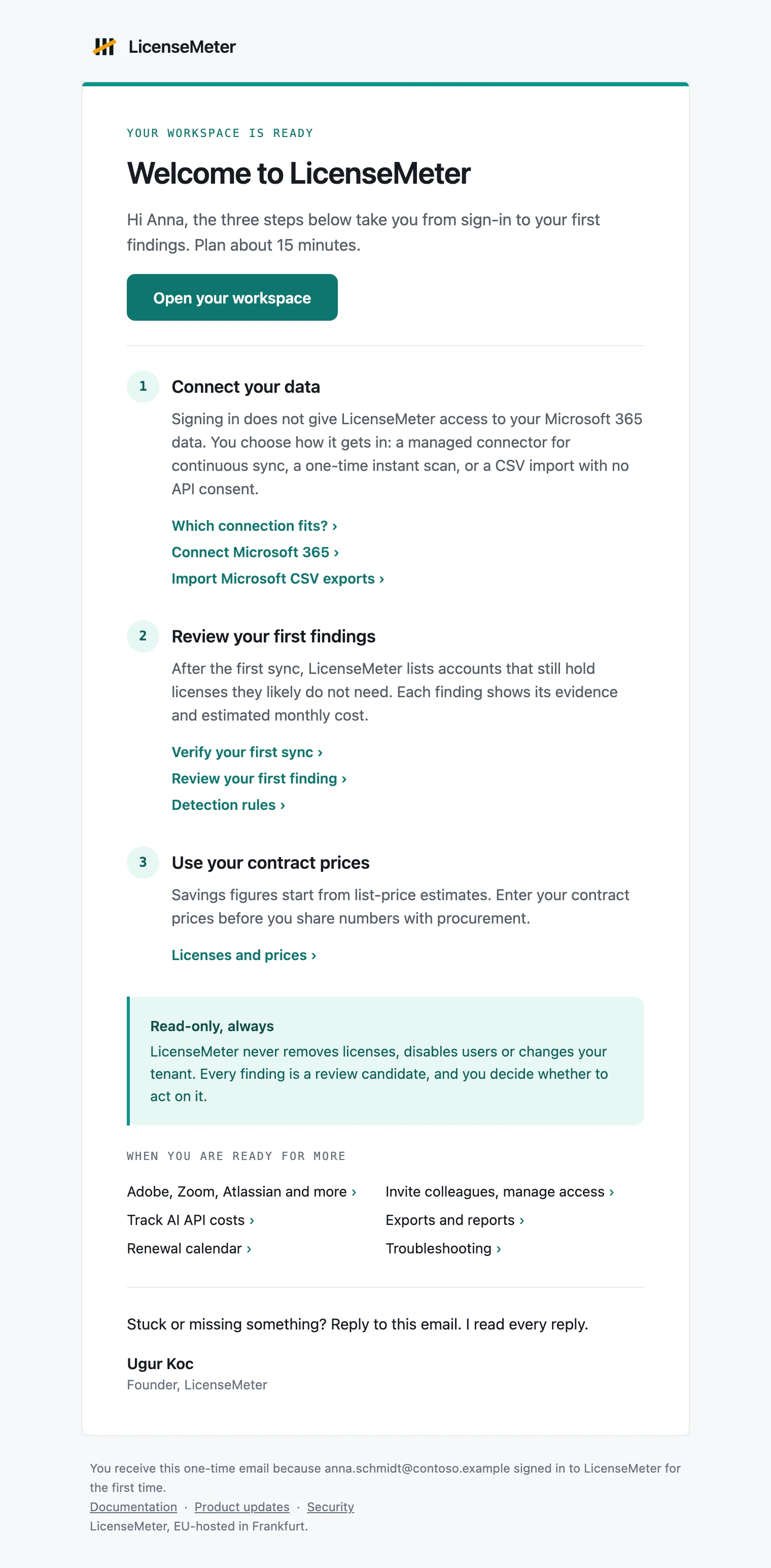
Sent once, when your first sign-in creates your own workspace. It walks you through three steps: connecting your data, reviewing your first findings and entering your contract prices. Each step links the guide that covers it.
Example with fictional data.
| Detail | Description |
| ----------- | ---------------------------------------------------------------------------------------------- |
| Subject | Welcome to LicenseMeter: your first 15 minutes |
| Sent to | The person whose sign-in created the workspace, at the address Microsoft confirmed for them |
| Not sent to | Colleagues who join an existing workspace, the sample workspace, and self-hosted installations |
| How often | Once. There is nothing to unsubscribe from |
Replies to this email reach the LicenseMeter team.
## Weekly digest
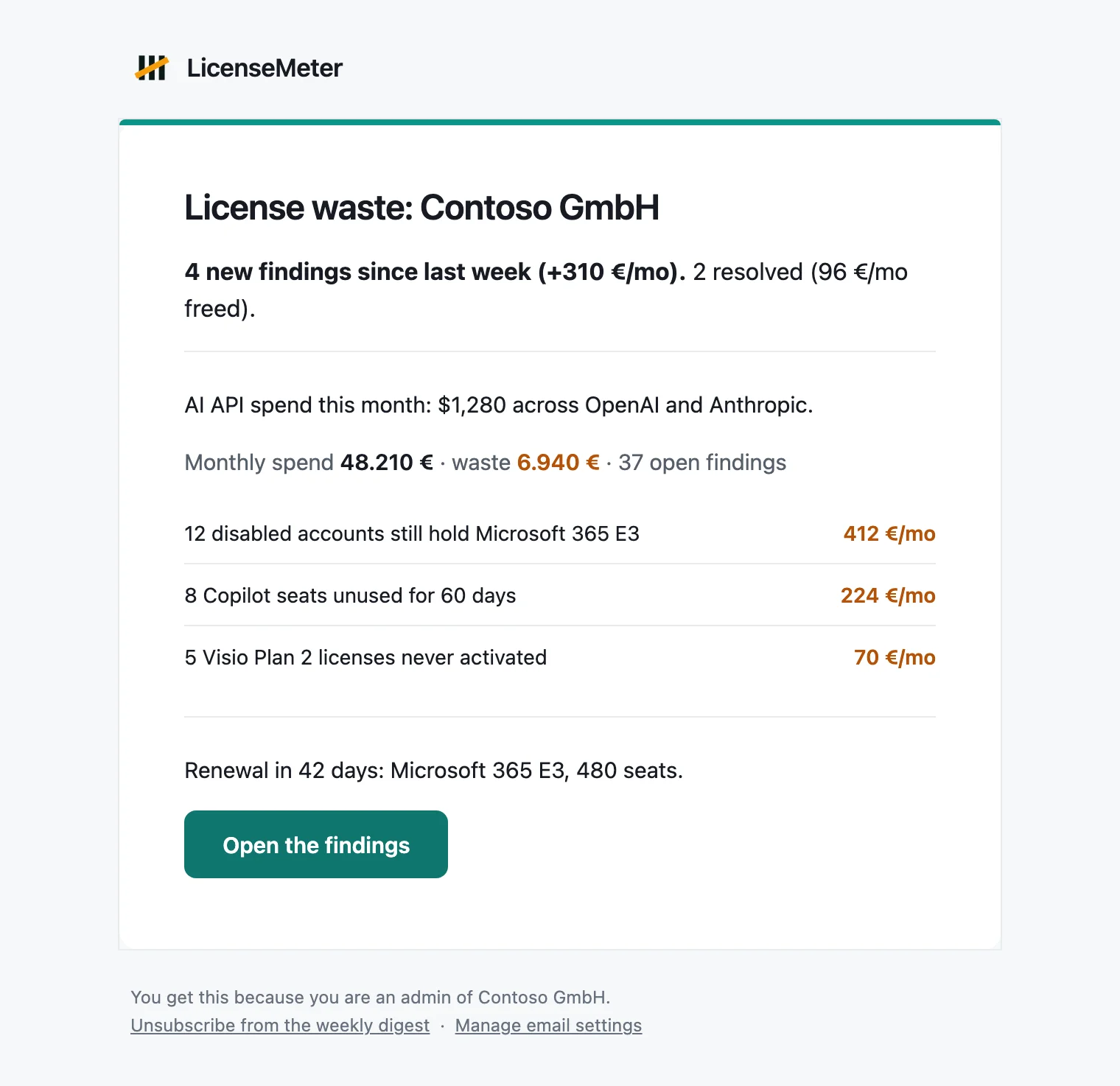
A Monday summary of what changed. It leads with the findings that are new since last week and the ones that were resolved, then shows your monthly spend, the estimated waste, the number of open findings and the most expensive ones. When a renewal is near or your workspace tracks AI API costs, it adds one line for each.
Example with fictional data.
| Detail | Description |
| ----------- | ------------------------------------------------------------------------------------------------------------------------------ |
| Subject | Starts with "LicenseMeter:" and names your workspace |
| Sent to | Every Owner and Admin of the workspace, each with their own copy, and the shared notification address if the workspace has one |
| When | Mondays at 06:00 UTC |
| Turn it off | **Settings**, under **Email me**, or the unsubscribe link at the bottom of the email |
Turning the digest off is personal. It affects only you and only that workspace. Other Admins decide for themselves.
A workspace with no open findings does not go silent. If it synced within the last eight days, the digest is replaced by a short all-clear that also names what was resolved during the week.
## Leak alert
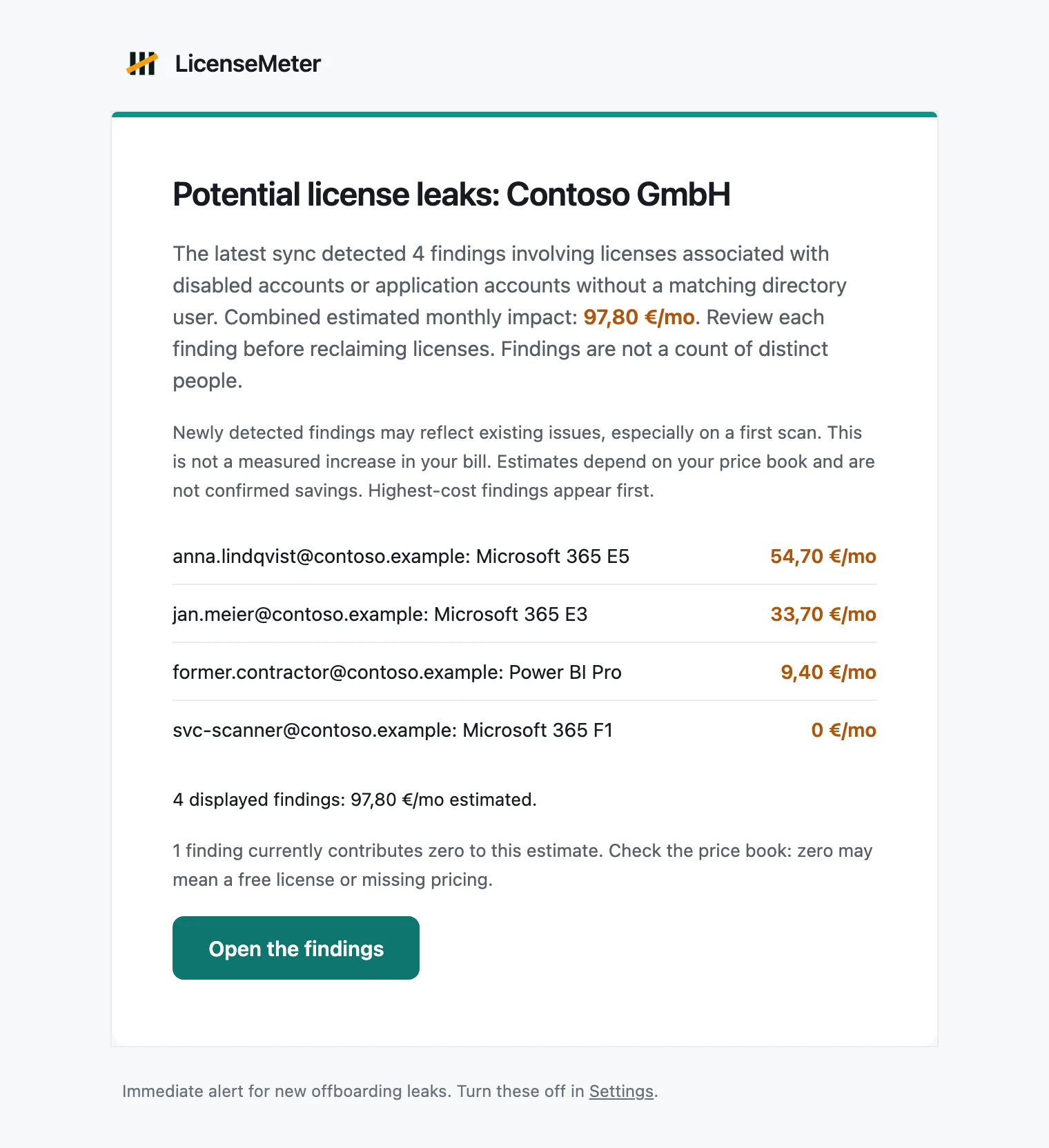
Sent right after a sync that detects new offboarding leaks: licenses that are still paid for although the account was disabled, or although no matching directory user exists. These findings cost money every month until someone acts, so they do not wait for the Monday digest.
The email lists the ten most expensive findings first. It then states the subtotal of the listed findings, the subtotal of any further findings, and how many findings add nothing to the estimate because the license is free or has no price yet. The listed and further subtotals always add up to the headline figure.
Example with fictional data.
| Detail | Description |
| ----------- | ---------------------------------------------------------------------------------------------------- |
| Subject | Names the number of potential license leaks, your workspace and the estimated monthly impact |
| Sent to | Every Owner and Admin of the workspace, and the shared notification address if the workspace has one |
| When | After a sync that finds new leaks. The scheduled sync runs daily at 03:00 UTC |
| Turn it off | **Settings**, **Leak alert emails**. This switch applies to the whole workspace |
{% hint style="warning" %}
The figure is an estimate from your price book, not a measured increase in your bill. A first sync often reports leaks that have existed for months. A finding is a license to review, not a count of people. Check each one before you reclaim a license, and enter your contract prices under [Licenses and prices](/licenses-and-prices.md) so the estimate reflects what you pay.
{% endhint %}
See [Detection rules](/findings/rules.md) for what counts as a leak and [Remediation workflow](/findings/workflow.md) for what to do next. If an alert never arrived, an Owner or Admin can ask for the leaks that are open right now, described under [Recover missed email](#recover-missed-email).
## Invitation
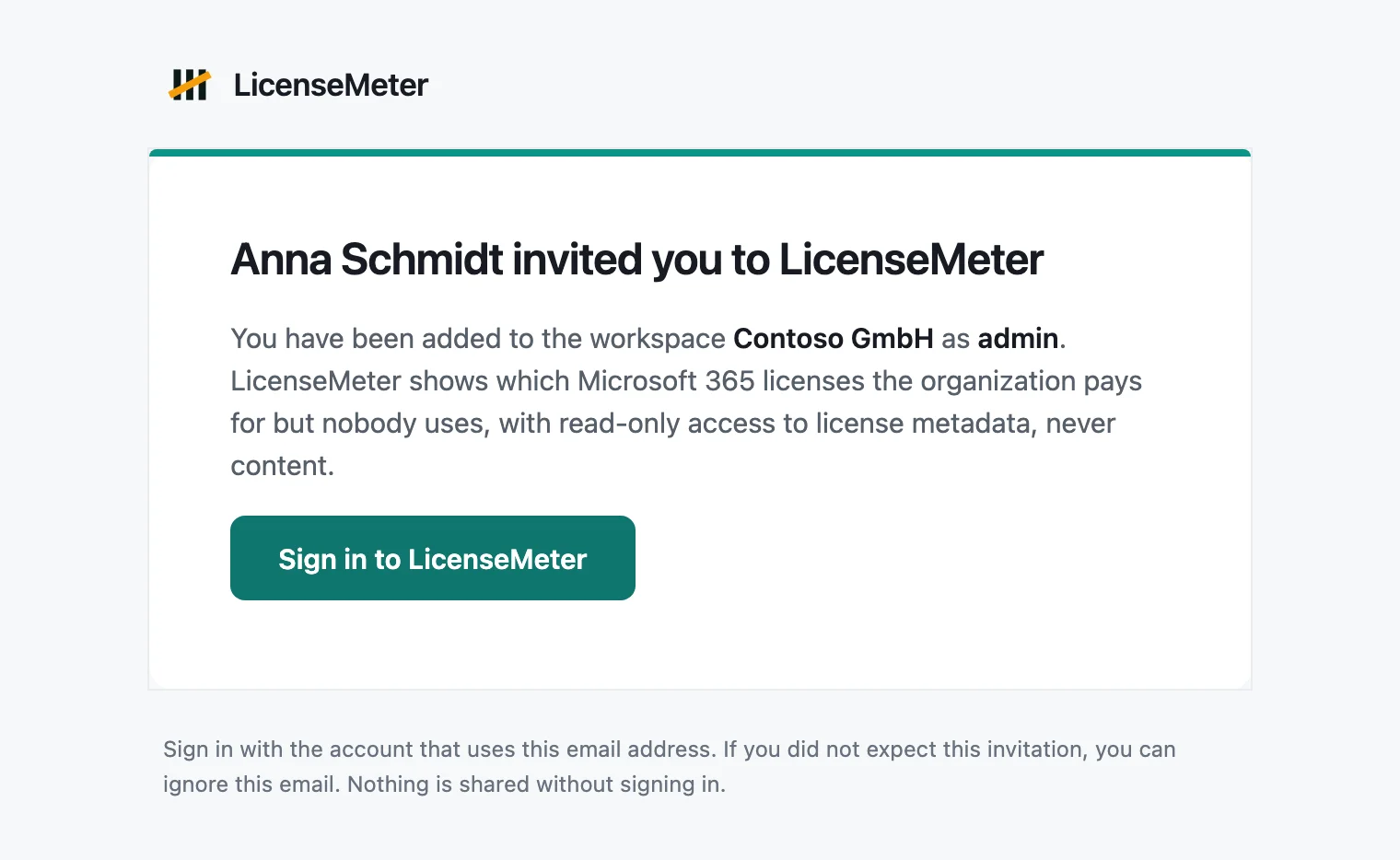
Sent when an Owner or Admin invites you under **Settings**, **Members**. It names the person who invited you, the workspace and your role.
Example with fictional data.
| Detail | Description |
| ---------- | ------------------------------------------------------------------------ |
| Subject | Names the person who invited you and the workspace |
| Sent to | The address the inviter entered |
| Valid for | 14 days. **Resend** in Members restarts that period |
| What to do | Sign in with the Microsoft work or school account that uses this address |
Nothing is shared until you sign in. If you did not expect the invitation, ignore it. If signing in does not open the workspace, see [Invite colleagues and manage access](/workspace/members.md).
## Other emails
| Email | Sent to | When |
| ------------------------ | --------------------------------------------------------------------------------- | ------------------------------------------------------------------------------------------------------------------------------------- |
| Monthly report | Owners and Admins who have not turned it off, and the shared notification address | On the 1st of the month at 07:00 UTC, with the PDF report attached, when the workspace has the monthly report enabled in **Settings** |
| All clear | Owners and Admins who receive the digest | In place of the weekly digest when no findings are open |
| Access request | Owners and Admins | A colleague with a verified company address asked to join the workspace |
| Colleague joined | Owners and Admins | A colleague joined automatically because the workspace allows it |
| Access approved | The person who asked | An Owner or Admin approved their request |
| Confirm your account | The address of an existing membership | Someone signed in and asked to open the workspaces that belong to this address. The link works once and for a limited time |
| Workspace deleted | The remaining Owners and Admins | A workspace was deleted. This notice cannot be turned off |
| Confirm a shared address | The address an Owner or Admin entered | Somebody added a shared notification address. The link works once and for 24 hours |
## Shared notification address
A workspace can add one shared mailbox, for example , that receives the workspace email as well. It is meant for a team address that nobody signs in with: a ticket queue, a licensing inbox, a distribution list.
The address is added on top of the people who already get the mail. Nobody loses their copy when one is added, and the personal switches under **Email me** keep working exactly as before.
{% hint style="warning" %}
The emails contain account names and license costs. Everyone who can read that mailbox can read those figures, and the mailbox has no LicenseMeter sign-in and no role. Add an address only if that is what you want.
{% endhint %}
### How it is confirmed
{% stepper %}
{% step %}
#### Enter the address
Under **Settings**, **Shared notification address**, an Owner or Admin enters the address and sends the confirmation email.
{% endstep %}
{% step %}
#### Somebody confirms it
LicenseMeter sends one email to that address with a link. Opening the link changes nothing: it shows what the address will receive and asks for a confirmation. The link works once and expires 24 hours after it was sent.
{% endstep %}
{% step %}
#### It starts receiving mail
From the confirmation on, the address receives the emails its switches are set to. Until then it receives nothing.
{% endstep %}
{% endstepper %}
Entering another address replaces the request and kills the older link. An address that is already confirmed keeps receiving mail while a replacement waits for its confirmation, so a typo never interrupts anything. **Send the link again** mails a fresh link, which also voids the previous one.
### What it receives
Three switches under the address decide whether it gets the weekly digest, the monthly report and leak alerts. They are independent of the workspace switches and of anyone's personal preferences: a workspace that has the monthly report turned off sends none, no matter what the shared address asks for.
Every digest and report to the shared address carries its own unsubscribe link. Using it turns off that one email for that one workspace and touches nobody's membership. **Remove address** under **Settings** deletes the address, any pending confirmation and the switches in one step.
Only Owners and Admins see and change any of this. The sample workspace never sends email and has no shared address.
## Delivery status
Owners and Admins find **Email delivery** under **Settings**. It lists the latest digests, reports and leak alerts for the workspace, each with the recipient and what the mail provider reported back: delivered, delayed, bounced or marked as spam.
When an address bounces permanently, is held back by the mail provider, or a recipient marks an email as spam, LicenseMeter stops sending email to it and shows it under **Blocked addresses** with the reason. One dead mailbox then no longer affects delivery for everyone else in the workspace. Blocks are per workspace: the same address can still receive mail in another workspace.
On a self-hosted installation the section is only filled in when the operator configured the mail provider webhook. Without it, **sent** means the mail provider accepted the message, not that it arrived, and the section says so.
## Recover missed email
When email went wrong, an Owner or Admin has two controls under **Settings**, **Email delivery**. Both are recovery actions: neither turns a scheduled email on, and neither changes anyone's preferences.
### Send the current findings
**Send the current findings** emails the offboarding leaks that are open at that moment to every Owner and Admin and to a confirmed shared notification address. Use it when a leak alert never arrived, for example because the mailbox bounced, because the leak alert switch was off at the time, or because the findings were already known to LicenseMeter before anybody was watching.
| Detail | Description |
| -------- | ------------------------------------------------------------------------------------------------------------------------------------------------------ |
| Subject | Names the number of potential license leaks that are open, your workspace and the estimated monthly impact |
| Sent to | Every Owner and Admin, and the shared notification address once it is confirmed. The leak alert switches do not apply, because the email was asked for |
| Contains | The same figures as the leak alert, from the findings that are open right now. It is not a copy of an earlier email |
| Limit | Three requested sends per workspace per day |
The button asks for a confirmation and names how many people it reaches before anything is sent. Afterwards it reports what happened, for example how many people received it and how many addresses were blocked. Findings that are already resolved are left out, and a workspace with no open leaks is told that there is nothing to send. Each request is recorded in the activity log.
### Clear a block
Every address under **Blocked addresses** has a **Clear block** control. Clearing removes the block for this workspace, so the address is mailed again on the next send.
{% hint style="warning" %}
Clearing a block does not repair a mailbox. The mail provider keeps a suppression list of its own, so an address that is still undeliverable can stay undeliverable and be blocked again on the next permanent failure. Clear the block after the mailbox itself was fixed.
{% endhint %}
The block is cleared for one workspace only. The same address stays blocked in any other workspace that blocked it, and the change is recorded in the activity log.
## If an email does not arrive
* Check the spam folder and any quarantine your organization runs, then allow the sender.
* Confirm the address. LicenseMeter writes to the address of your membership, shown under **Settings**, **Email me**.
* Only Owners and Admins receive the digest, the report and leak alerts. Viewers do not.
* The digest and the report respect your personal switch, and leak alerts respect the workspace switch.
* Check **Settings**, **Email delivery** for what the mail provider reported, and whether the address is listed under **Blocked addresses**. A blocked address can be cleared there once the mailbox works again.
* To catch up on leaks you may have missed, use **Send the current findings** under **Email delivery**.
* A shared notification address only receives mail after somebody confirmed the emailed link, and only for the switches that are on.
* The sample workspace never sends email.
On a self-hosted installation, email works only when the operator has configured a mail service and the scheduler is running. See [Self-hosting with Docker](/self-hosting.md).
---
# Agent Instructions
This documentation is published with GitBook. GitBook is the documentation platform designed so that both humans and AI agents can read, navigate, and reason over technical content effectively. Learn more at gitbook.com.
## Querying This Documentation
If you need additional information that is not directly available in this page, you can query the documentation dynamically by asking a question.
Perform an HTTP GET request on the current page URL with the `ask` query parameter, and the optional `goal` query parameter:
```
GET https://docs.licensemeter.com/workspace/emails.md?ask=&goal=
```
`ask` is the immediate question: it should be specific, self-contained, and written in natural language.
`goal` is optional and describes the broader end goal you are ultimately trying to accomplish on behalf of the user. GitBook uses it to tailor the answer towards what is most useful for that goal.
The response will contain a direct answer to the question and relevant excerpts and sources from the documentation.
Use this mechanism when the answer is not explicitly present in the current page, you need clarification or additional context, or you want to retrieve related documentation sections.