> For the complete documentation index, see [llms.txt](https://docs.licensemeter.com/llms.txt). Markdown versions of documentation pages are available by appending `.md` to page URLs; this page is available as [Markdown](https://docs.licensemeter.com/workspace.md).
# Workspace and dashboard
Read the overview, investigate the highest-impact findings, and keep workspaces separate.
A workspace contains one set of connected data, prices, members, settings and findings. Check the workspace name in the sidebar before reviewing or changing anything.
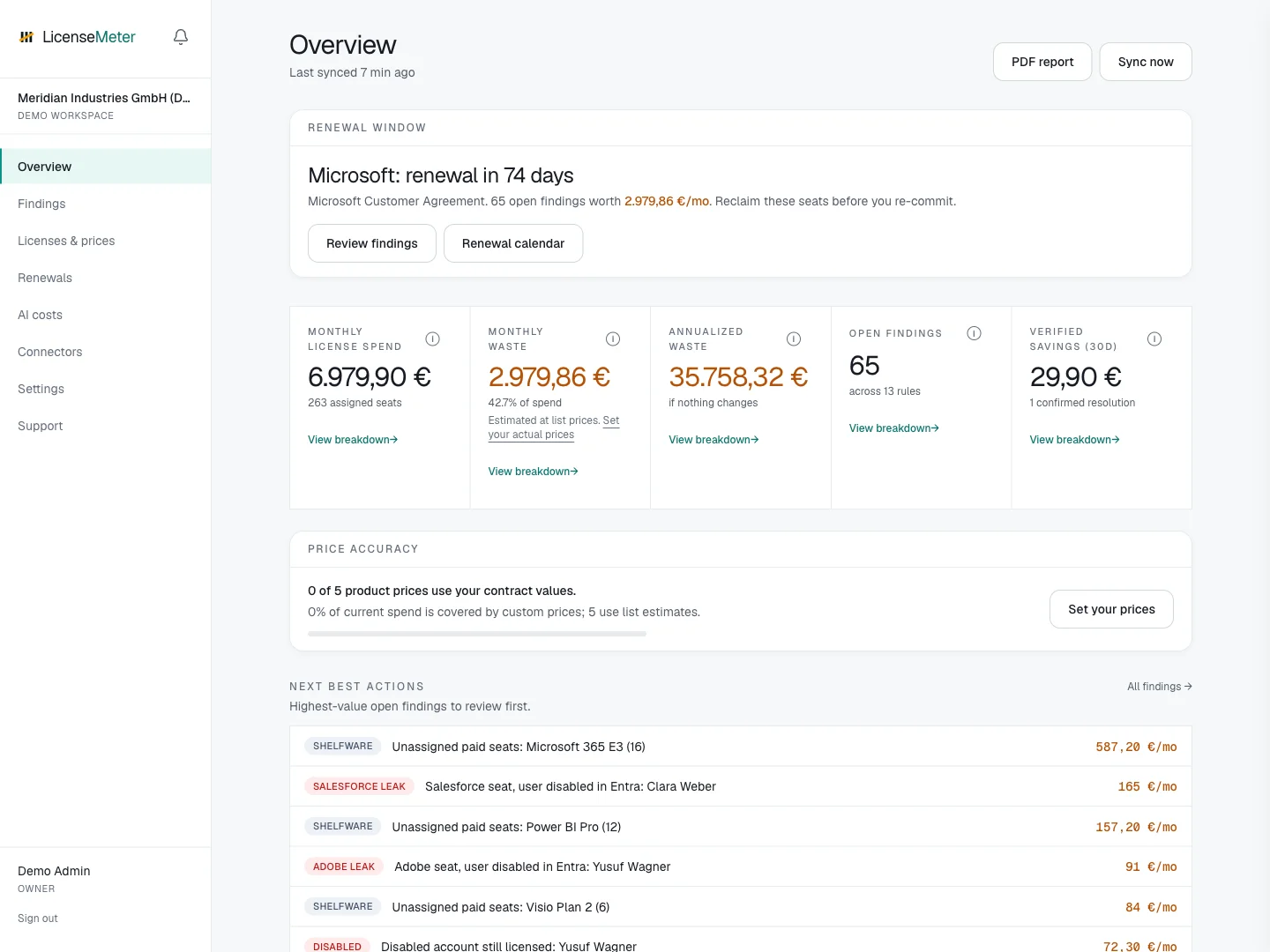
LicenseMeter sample workspace. All names, costs and findings shown are demonstration data.
## Read the headline metrics
| Metric | Meaning |
| ---------------------- | ------------------------------------------------------------------------------------------- |
| Monthly license spend | Assigned seat counts multiplied by the configured monthly product prices |
| Monthly waste | Estimated monthly impact of unresolved findings, based on the price book |
| Annualized waste | Monthly waste multiplied by twelve, assuming nothing changes |
| Open findings | Unresolved findings, including acknowledged items |
| Verified savings (30d) | Monthly impact of findings that a later sync automatically resolved during the last 30 days |
Select **View breakdown** on a metric to inspect its calculation. The figures are estimates, not invoice reconciliation. A resolved finding indicates that its detection condition disappeared; contract terms determine when spend actually falls.
## Decide what to review next
**Next best actions** prioritizes open findings by estimated impact. **Price accuracy** shows how much of the inventory uses your contract prices. **Renewal window** highlights a contract deadline so you can investigate before recommitting seats.
Use **Last synced** to judge data freshness. A recent timestamp does not by itself prove that every provider returned every signal; check [Settings and sync history](/workspace/settings.md) for limitations or failures.
For your first assessment, follow [Review your first finding](/getting-started/first-review.md) to connect these metrics to a concrete decision and report.
## Multiple workspaces
Use the workspace switcher when available. **Portfolio** summarizes the workspaces you can access; a workspace with a different currency or incomplete prices needs its own context when comparing totals. Your membership and role apply separately to each workspace. On mobile, open the navigation menu to find the switcher. A pending company-domain request does not grant access; follow [workspace invitations and approvals](/workspace/members.md).
Next: [Roles and access](/workspace/roles.md), [Findings](/findings.md), or [Renewals](/renewals.md).
---
# Agent Instructions
This documentation is published with GitBook. GitBook is the documentation platform designed so that both humans and AI agents can read, navigate, and reason over technical content effectively. Learn more at gitbook.com.
## Querying This Documentation
If you need additional information that is not directly available in this page, you can query the documentation dynamically by asking a question.
Perform an HTTP GET request on the current page URL with the `ask` query parameter, and the optional `goal` query parameter:
```
GET https://docs.licensemeter.com/workspace.md?ask=&goal=
```
`ask` is the immediate question: it should be specific, self-contained, and written in natural language.
`goal` is optional and describes the broader end goal you are ultimately trying to accomplish on behalf of the user. GitBook uses it to tailor the answer towards what is most useful for that goal.
The response will contain a direct answer to the question and relevant excerpts and sources from the documentation.
Use this mechanism when the answer is not explicitly present in the current page, you need clarification or additional context, or you want to retrieve related documentation sections.